Best Workforce Planning Software UK: A Buyer Guide (2026)
Published 11 November 2026
A UK buyer's guide to workforce planning software: what it must do, what it costs, and when a spreadsheet still wins — with worked payroll numbers.

What is the best workforce planning software for a UK business?
There is no one best workforce planning software for every UK business. The right choice depends on how many people you employ. A small firm usually does best with a simple tool or a spreadsheet, while a larger employer needs a dedicated system that forecasts demand, tracks skills and prices every hire.
That is the honest answer, and the rest of this guide shows you how to reach it for your own business. You will learn what the software actually does, what it costs, how to judge a demo, and where most buyers go wrong. This guide names no vendor: the established products in this category price by quote only, so the honest comparison is by size and approach, not by brand — the table under "Which type of tool fits your size?" is the shortlist. Every number in the worked examples comes from UK Payroll Calculators, a free hub of UK payroll calculators built on the April 2026 rules, checked against GOV.UK — so you can repeat the sums yourself before you spend anything.
What is workforce planning software, and what does it actually do?
Workforce planning software helps a business answer three questions: how many people will we need, what skills will they need, and what will they cost? It takes the headcount plan out of a manager's head and puts it somewhere the whole business can see, test and argue about.
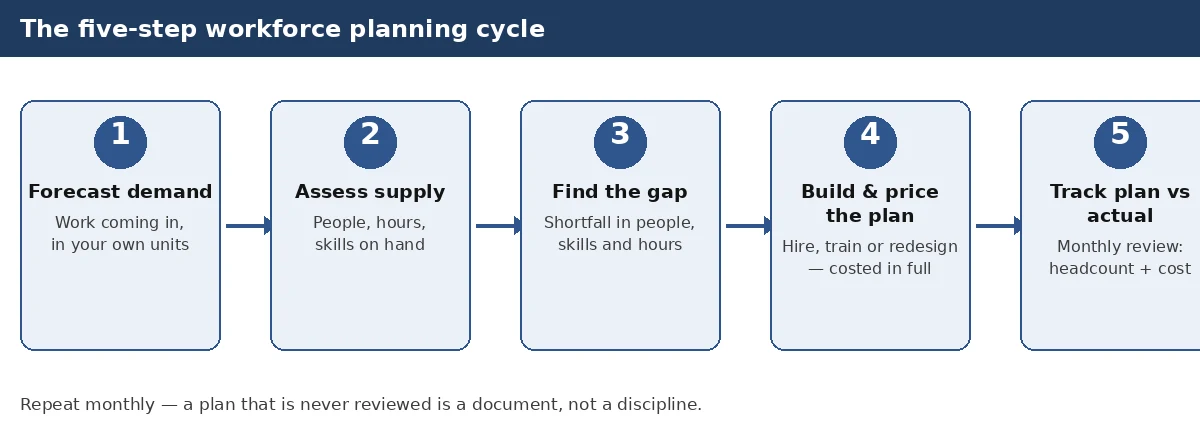
A good system does five things. First, it forecasts demand — how much work is coming, and how many hands that work needs. A care provider counts visits, a warehouse counts picks, a consultancy counts billable days. Second, it looks at supply — the people you already have, the hours they actually work, and the skills they hold. Third, it finds the gap between the two, in numbers: three nurses short in March, two engineers short by summer. Fourth, it prices the gap, because a hire is never just a salary. And fifth, it tracks the plan against reality, month by month, so a plan made in January still means something in September.
Notice what is not on that list. The software does not do the thinking for you. It cannot tell you whether your business will grow, which contract you will win, or which employee will leave. What it does is make your assumptions visible, so a wrong assumption shows up early, while it is still cheap to fix.
That is why the market for this software is confusing. The label covers very different tools: a planning module inside a big finance system, a headcount planner built for finance teams, a frontline system built around shifts and rotas, and a simple add-on to the HR system you already run. They all call themselves workforce planning software. They are not the same purchase, and this guide treats them as four different answers to four different problems.
How is workforce planning different from headcount planning and rota software?
These three terms get mixed up constantly, and buying the wrong one is the most expensive mistake in this market. They answer different questions.
Headcount planning asks: how many people, in which roles, at what cost, over the next budget cycle? It is the financial core of the subject — a numbers exercise, usually owned by finance, usually looking one year ahead. If your main question is "can we afford the team we have planned?", headcount planning is what you need.
Workforce planning is broader and longer. It asks: what skills will we need in one to three years, who is likely to leave, who can be trained into the gap, and how do we hire for what we cannot train? It covers retention, succession, training and hiring — not just the count and the cost. If your main question is "will we have the right people, with the right skills, when we need them?", that is workforce planning.
Rota and scheduling software is something else again. It asks: who works which shift this week? It is about the next seven days, not the next two years. A rota tool is essential for a shop, a ward or a warehouse — but it will not tell you whether you need twelve more staff next spring. Many businesses buy a rota tool thinking they have bought a planning tool, then wonder why they still get caught short every busy season.
The test is simple. If the tool's main screen is a calendar of shifts, it is rota software. If its main screen is a budget table of roles and costs, it is headcount planning. If its main screen is a forecast of demand, supply and skills over quarters and years, it is workforce planning. Before you look at any product, write down which of those three questions you are actually trying to answer. Most small UK businesses discover they need headcount planning first, and full workforce planning later — and that discovery alone can save thousands.
What should good workforce planning software do?
Judge any tool against the same checklist, and do it before the sales demo, not during it. A demo is designed to show you the best parts. A checklist forces you to ask about the rest.
Demand forecasting comes first. The tool must let you build demand from your own drivers — orders, patients, pupils, covers, calls — not from a generic template. Ask how the forecast is built, and whether you can change the drivers when the business changes. A forecast you cannot edit is a guess you cannot fix.
Supply and skills come second. The system must hold a real picture of the people you have: their contracted hours, their skills, their qualifications and expiry dates, and their likely leaving dates. A headcount number without skills attached is nearly useless — ten people is not ten people if three of them cannot do the work that is coming. Ask how skills are recorded, and who keeps them up to date. If the answer is "someone in HR, manually", the data will be out of date within a month.
Scenario modelling is third, and it is where the money is. The tool must let you ask "what if" and get an answer in minutes, not days: what if we win that contract, what if two senior staff leave, what if the minimum wage rises again, what if we open a second site? A plan with one scenario is a hope, not a plan. Ask to see three scenarios built live in the demo, with costs attached to each.
Costing is fourth — and it is the part most buyers under-check. The plan must price every hire properly: salary plus employer National Insurance, plus workplace pension, plus anything else the business pays. A plan built on salaries alone understates the truth by roughly 15%, and that error compounds across a whole team. Our employer cost calculator shows the shape of it — a £30,000 salary costs £34,462.80 a year once the on-costs are added, as worked out in full below. Any planning tool that cannot show you that uplift is not planning; it is counting.
Plan-versus-actual tracking is fifth. The tool must compare what you planned with what happened, every month, without a rebuild. Ask what the monthly review looks like, and how long it takes. If the answer involves exporting to a spreadsheet and starting again, the tool will be abandoned by March.
Then there are the unglamorous essentials: it must take data in from your payroll and HR records without retyping, it must let your data out again in a usable format if you ever leave, it must handle UK rules — the National Living Wage, Statutory Sick Pay, auto-enrolment, right-to-work checks — and it must be clear about where your data is held and who can see it. Ask each of those questions in writing before you buy. The answers, or the absence of them, tell you more than any demo.
How much does workforce planning software cost in the UK?
Here is the fact that surprises most buyers: none of the six established products we checked publishes a list price. Each one is priced on enquiry, by quote, after a conversation with their sales team — only invitations to book a demo and talk to sales.
That matters for two reasons. First, you cannot compare prices from a website. Any price you see quoted for these products on a review site or a listicle is a third-party estimate, not the vendor's price, and it should never be treated as one. Second, the real cost is not the subscription. It is the subscription plus the setup, the data cleanup, the training, and the time your own staff spend feeding it. A tool that costs little per month but needs a month of your finance manager's time is not cheap.
So how do you budget? Start from what you can verify. The subscription is usually priced per employee per month, or as an annual platform fee, and it is almost always negotiable — which means the first number you hear is rarely the last. Setup is where the surprises live: connecting the tool to your payroll and HR records, cleaning years of messy job titles and skill lists, and training the people who will actually use it. Ask every supplier for three numbers in writing: the annual subscription for your headcount, the one-off setup cost, and the cost of leaving — what you pay, and what happens to your data, if you cancel after a year.
Then add the cost nobody quotes: your own time. Somebody has to own the plan. In a small business that is usually the owner or the office manager, an hour or two a week. In a mid-sized business it is a named person in HR or finance, half a day a week at least. If nobody owns it, the tool becomes an expensive dashboard that nobody opens, and the plan goes back to living in a spreadsheet — which is where it started.
A useful rule of thumb of ours: if the total first-year cost is more than about 1% of your payroll, stop and ask what exactly you are buying that a cheaper route cannot give you. For a business with a £500,000 payroll, that is £5,000. Below that line, the tool has to earn its keep quickly. Above it, you need a written business case, not a good demo.
What does each person in your plan really cost?
This is the section most planning guides skip, and it is the one that decides whether your plan survives contact with your bank account. A workforce plan is a money plan. Every person in it has a true cost, and the true cost is always higher than the salary.
Take one hire on £30,000 a year. The salary is £30,000. Employer National Insurance adds £3,750 — 15% on the £25,000 above the £5,000 Secondary Threshold. The workplace pension adds £712.80 — 3% of the qualifying earnings of £23,760, the slice of pay between £6,240 and £50,270. The total is £34,462.80 a year, or £2,871.90 a month. That is £4,462.80 on top of the salary before you have bought a laptop, paid for training, or covered a single day of sick leave. We ran these exact figures through our employer cost calculator and checked them against GOV.UK's 2026/27 rates on 11 November 2026 — you can run the same numbers yourself in under a minute.
Now scale it. Ten people on £30,000 is not £300,000. It is £344,628 a year. Twenty people is £689,256. A plan that adds five people at £30,000 adds £172,314 to your annual cost, not £150,000 — and the £22,314 difference is the part that quietly breaks budgets. If your plan also assumes a pay rise, remember the uplift grows with the salary: at £50,000 the true cost is £58,062.80, which is 16.13% on top, because the £5,000 threshold shelters a smaller share of a bigger salary.
There are two offsets worth knowing, because a good plan accounts for them. The Employment Allowance can take up to £10,500 a year off an eligible employer's total National Insurance bill — but it applies to the whole payroll, not to one employee, so it should never be deducted from a single hire's cost. The Apprenticeship Levy goes the other way: it adds cost, but only for employers whose annual pay bill exceeds £3 million, so almost no small employer pays it at all. A planning tool that applies either of these per person is doing the maths wrong.
How much capacity do you lose to leave and sickness?
Then comes capacity, which is where plans most often fail. A person is not a full year of work. They take leave, they fall sick, they train, they have bank holidays. The law gives almost every worker 5.6 weeks of paid holiday a year — 28 days on a five-day week. A part-timer on three days a week gets 5.6 times 3, which is 16.8 days a year, or 126 hours at a 7.5-hour day. That is GOV.UK's own worked example, and our annual leave calculator reproduces it exactly — we re-checked it live on 11 November 2026. For irregular hours, leave builds up at 12.07% of the hours actually worked: 100 hours worked earns 12.07 hours of leave, rounded to 12 when booked.
What does that mean for a plan? A team of ten full-timers has 280 days of statutory leave a year to cover — more than a full person-year of absence before anyone is sick. If your plan counts ten people as ten full years of capacity, it is already wrong by a tenth, and that is before sickness. Statutory Sick Pay runs at £123.25 a week under the April 2026 rules, or 80% of average weekly earnings if that is lower, for up to 28 weeks — and the employer pays it, with no reclaim from HMRC. Our SSP calculator works out the daily rate for any pattern, and it is the figure your plan should carry for every absence, not a guess.
And there is a legal floor under all of it. A capacity plan that quietly adds unpaid hours breaks the National Living Wage. Take a worker on £26,000 a year who regularly works five unpaid hours a week on top of a 37.5-hour week: their average hourly rate falls to £11.76, below the £12.71 floor for workers aged 21 and over that has applied since April 2026. Our overtime calculator flags exactly that fail. A workforce plan must price every hour it asks for — if the hours are in the plan, the pay must be too.
Which type of tool fits your size?
The market splits into four approaches, and the right one follows the size of your business more than anything else. Here is the honest comparison, built from what the established products actually publish about themselves — including the fact that the six products we checked all price by quote only.
| Approach | Best for | Cost shape | Setup effort | Payroll connection | Honest limit |
|---|---|---|---|---|---|
| Spreadsheet, done properly | Under 10 people | Almost nothing — time only | An afternoon | Manual — you type the numbers in | Breaks past about 15 people; no live data; one person's knowledge |
| HR system add-on | 10–50 people | Modest add-on to a system you already pay for | Days — uses data you already hold | Strong — same system as your HR records | Shallow planning; built for today, not three years out |
| Dedicated planning suite | 50–200+ people | Annual platform fee, priced by quote | Weeks to months; needs clean data | Varies — check the integration, not the brochure | Oversized and overpriced below 50 people; needs a named owner |
| Frontline workforce module | Shift and hourly workforces, any size | Annual fee, priced by quote | Weeks; needs rota and time data | Strong for hours worked; weaker for skills and careers | Planning is one module of a big suite — wrong buy if you mainly need org design |
Read that table against your own headcount and be strict with yourself. Under ten people, a spreadsheet plus a proper costing habit beats any bought system. You know every person, you know the work, and the plan fits on one page. The discipline matters more than the tool: price every hire fully, subtract leave, and review the plan monthly. Our free calculators do the pricing part — the employer cost calculator for the true cost of a hire, the annual leave calculator for capacity, and the hourly rate converter when you are comparing an hourly rate with a salary.
Between ten and fifty people, the add-on route usually wins. Your HR system already holds the people, the hours and the pay. A planning add-on builds on that data instead of asking you to maintain a second copy. Zoho People works the same way for firms on Zoho — the leave, attendance and people records are already in one place, so the plan starts from live data rather than a spreadsheet copy. The planning will be shallower than a dedicated suite — a year ahead, not three — but for a business of this size, a year ahead, done properly, is the right ambition.
Between fifty and two hundred people, a dedicated suite starts to earn its keep — if, and only if, someone owns it. At this size the plan has too many moving parts for a spreadsheet: multiple sites, multiple skill groups, leavers and joiners every month. The suite's value is that it holds the whole picture in one place and re-prices it when something changes. Without a named owner spending real time on it each week, it becomes the most expensive spreadsheet you own.
Above two hundred people, or across several sites, you need the dedicated route, and you probably already know it. The question is no longer whether to buy, but which kind: a finance-led planning suite if the plan is driven by budgets, or a frontline workforce system if the plan is driven by shifts, hours and sites. A retailer, a care provider or a facilities business with hourly staff should look at the frontline route first; a professional services firm should look at the finance-led route.
One more verdict, and it is the one buyers resist most: if you have fewer than ten people and no one whose job includes planning, do not buy anything yet. Buy the habit first. Plan on a spreadsheet for two quarters, price every hire properly, and see whether you actually keep the plan alive. If you do, you will know exactly what you need a tool to do. If you do not, a bought tool will not fix it — it will just automate the neglect.
How do you judge a demo before you buy?
Never judge a tool on a sales demo alone. A demo is a performance: the best data, the easiest scenario, the friendliest questions. Judge it on your own data and your own worst case instead.
Before the demo, prepare three things. First, a real scenario from your business: a busy month, a quiet month, and a shock — a contract won, a key person leaving, a new site opening. Second, a messy export of your real people data: the payroll list with its odd job titles, the skills list with its gaps, the leavers from the last year. Third, a list of questions the demo must answer, sent in advance, so the salesperson cannot improvise around them.
During the demo, ask for your scenario to be built live, with your data, in front of you. Watch how long it takes and where it struggles. A tool that needs its data perfectly clean before it works will never work for you, because your data will never be perfectly clean. Ask how the tool handles a part-timer, a zero-hours worker, an apprentice, and someone on long-term sick leave — the four cases that break most plans. Ask what happens when the plan changes mid-year, and how long the re-plan takes. Ask who owns the data quality, and what the tool does when two systems disagree about the same person.
After the demo, ask for a trial with your own data — not a sample dataset, yours. Most of the products we checked offer a demo rather than a free trial, and one of the six offers a free trial on its own page; where a trial exists, take it, and run your real planning cycle through it. If the supplier will not offer a trial, ask for a paid pilot: a small, fixed-price piece of work on one team, with a written success test. A supplier that refuses both is telling you something about how confident it is.
Finally, check the exit before you enter. Ask how you get your data out, in what format, and what it costs. Ask what happens to your history if you cancel. A tool that holds your workforce plan hostage is a risk, not an asset. Get the answer in writing — it is the cheapest insurance in this whole purchase.
What usually goes wrong when businesses buy planning software?
The same five mistakes show up again and again, and none of them is about the software itself.
The first is buying for a headcount you do not have yet. A 20-person business buys a system built for 500 people because it plans to grow — then spends a year feeding a system that needs a planning team it does not have. Buy for the business you are, with room to grow into the next size, not three sizes up.
The second is planning on salaries instead of true costs. A plan that prices a £30,000 hire at £30,000 is wrong by £4,462.80 before it starts, and across a team of twenty the error is nearly £90,000. The fix is simple and free: run every hire through our employer cost calculator before it enters the plan, and make the true cost the number everyone sees.
The third is forgetting absence. Leave, sickness, training and bank holidays are not rounding errors; they are a tenth or more of your capacity. A plan that counts heads without subtracting leave will promise work your team cannot deliver, and the shortfall will land in the busiest month. Count capacity in hours, not heads, and let the annual leave calculator do the part-time maths for you. Our absence management guide covers how to keep track of it all.
The fourth is dirty data. Job titles that mean three different things, skills recorded in free text, leavers still on the list, starters missing. No planning tool fixes dirty data; it only displays it more clearly. Budget a week of cleanup before you buy, and put one person in charge of keeping it clean afterwards.
The fifth is nobody owning the plan. Software does not plan; people plan, with software. If no one is named as the owner, with time in their week to maintain it, the plan dies quietly and the business goes back to guessing — now with a subscription to pay for the privilege. Name the owner before you sign anything.
There is a wider reason to take this seriously. The CIPD's HR Pulse Report 2026, published in October 2026 and based on 883 UK HR professionals surveyed between 1 May and 3 June 2026, found that 77% cite workforce planning and skills forecasting as a top priority — yet only 14% hold specialist skills in workforce planning, and only 61% agree their people function can identify the skills the organisation will need in the next one to two years. We verified those figures against the CIPD's own report on 11 November 2026. The gap between wanting a plan and being able to build one is the whole market for this software — and it is also the reason a tool alone will not close it. The skill matters as much as the system.
When is a spreadsheet still the right answer?
Often. A spreadsheet is the right answer whenever the plan is small, the business is stable, and one person holds the whole picture in their head. That describes most UK businesses under ten people, and a good number between ten and twenty.
A spreadsheet wins on three things: it costs nothing, it changes in seconds, and everyone already knows how to use it. Its weakness is also clear: it does not warn you when the data is stale, it does not scale past about fifteen people without becoming fragile, and it lives or dies with the one person who built it. If that person leaves, the plan leaves with them.
So use a spreadsheet deliberately, not by default. Keep one tab for demand, one for supply, one for the gap and its cost. Review it on the same day every month, with the same person, and write down what changed and why. The moment the review starts taking half a day, or the moment two people need to edit the same plan, it is time to look at a tool. That moment is your buying signal — not a sales call, not a competitor's announcement, and not a new year.
One practical tip: keep your spreadsheet honest with the same calculators you would use alongside a bought tool. The employer cost calculator prices each hire, the annual leave calculator counts capacity, the payslip generator shows what the employee actually receives, and the take-home pay guide explains the other side of the salary — what the employee keeps after tax and National Insurance. A spreadsheet built on verified numbers is a plan. A bought tool built on guesses is not.
How does workforce planning connect to payroll?
This is the connection most planning guides miss, and it is the one that matters most to a UK employer — because in this country, the plan and the payroll are the same people, the same hours, and the same law.
Start with pay. Every hour in your plan must be paid for at a lawful rate. The National Living Wage for workers aged 21 and over has been £12.71 an hour since April 2026, and the rates for younger workers sit below it. A plan that stretches a salary across more hours than the contract allows can push the average rate below the floor without anyone noticing — until HMRC notices. That is why the overtime check matters: the £11.76-an-hour fail worked out above. Your planning tool should be able to run that check, or you should run it yourself before the plan is approved.
Then sickness. Statutory Sick Pay (£123.25 a week, as worked out above) is paid by the employer, with no reclaim from HMRC. A plan that assumes full attendance is a plan that has never met a winter. Carry an absence allowance in every forecast, and use the SSP calculator to price it for your own patterns rather than guessing.
Then the tax code and the take-home side. A plan that hires at a salary the employee cannot live on will not hold the person — and the salary the employee sees is the take-home pay, not the gross. Our take-home pay guide explains what a salary is worth after tax and National Insurance, and the HMRC tax code checker sorts out the code that decides it. If your plan includes a salary that looks generous gross but thin net, expect the hire to leave — and budget the replacement.
Then the employment type. A plan that leans on contractors to fill a gap can trip over the off-payroll working rules, and the cost of getting it wrong is far higher than the cost of hiring properly. Our IR35 calculator gives a first read on whether a role sits inside or outside those rules. Similarly, a plan that converts an hourly rate into a salary — or the reverse — needs the conversion done right: our hourly rate converter runs both directions, and the 40k after tax guide shows what a £40,000 salary is actually worth.
The point is not that planning software must do payroll. It is that planning software must respect payroll — its rates, its rules, its records. When you evaluate a tool, ask how it gets its pay and hours data, how often, and from where. If the answer is a manual export once a quarter, the plan will always be out of date, and the payroll will always know first. If the plan grows faster than the cash coming in, payroll finance can bridge the gap until clients pay.
How do you start workforce planning this week?
You do not need software to start. You need one afternoon, the payroll list, and five steps. Run them in order, and write the answers down — a plan that exists only in a meeting is not a plan.
Step one: forecast demand. Write down the work coming in the next twelve months, in the units you actually measure — orders, visits, cases, projects, covers. Turn that work into hours, then into people. Be specific: "we need 400 extra hours a month from March" is a plan; "we need more staff" is a worry.
Step two: assess supply. List the people you have, their contracted hours, their skills, and the dates that matter — retirements, maternity, long-term absence, contracts ending. Include the leave: the 280 days of leave counted above, and the annual leave calculator will give you the exact figure for your own patterns. If someone is off sick for a long spell, the SC3 form guide explains the form and the process that follows. This step is where most plans fail, because it is the step that needs honest data instead of optimism.
Step three: find the gap. Subtract supply from demand, month by month, and write down the shortfall in people, skills and hours. A gap in March is a hiring decision in January; a gap next week is a crisis, not a plan. If the gap is skills rather than heads, training may close it cheaper and faster than hiring — and it keeps the person you already have.
Step four: build the plan and price it. For each gap, choose the fix — hire, train, move hours, use agency, or redesign the work — and price it properly, with employer National Insurance and pension on top of every salary. Run the numbers through the employer cost calculator before you present them; a plan that is wrong on cost will be wrong on everything else. If you fill the gap through a recruitment agency, the recruitment CRM guide explains how agencies run the pipeline your hire depends on.
Step five: track plan against actual, every month. One page, four numbers: planned headcount, actual headcount, planned cost, actual cost — plus the reason for any gap between them. A plan that is never reviewed is a document, not a discipline. The review takes an hour. Skip it twice and the plan is dead.
One more thing to weigh as you start: the hiring market is not standing still. The Office for National Statistics reported in its Labour Market Overview for October 2026, released on 20 October 2026, that UK vacancies fell to an estimated 691,000 in July to September 2026 — down 21,000, or 2.9%, on the quarter and 37,000, or 5.1%, on the year, the lowest outside the pandemic since July to September 2014 — and that smaller firms may not be recruiting because of increases in labour costs. We verified those figures against the ONS bulletin itself on 11 November 2026. A falling vacancy count cuts both ways: hiring may be easier than it was, but your own costs are the reason others are holding back. Either way, it is a reason to plan on verified numbers rather than on the mood of the market.
A note on what this guide does not do. We have not tested each of these tools by running a live business on it, and this guide claims no trial, no test and no star rating for any of them. Every one of the six established products we checked prices by quote only, so no price in this guide is presented as a vendor's price — and any price you see quoted elsewhere for these products should be treated as an estimate, not a fact. What we have done is check the category against its own published facts, and check the payroll numbers in it against GOV.UK and against our own calculators, live, on 11 November 2026. If a claim in this guide cannot be verified, it is not in it.
What should you do next?
Start with the number that decides everything else: the true cost of the people in your plan. That is how you choose the best workforce planning software for your business — not from a demo, but from your own numbers. Open the employer cost calculator, enter the salary of your next hire, and see the full cost — salary, employer National Insurance and pension — before you decide whether the hire fits the budget. That one figure turns a headcount wish into a business decision, and it takes less than a minute.
Frequently asked questions
What is workforce planning software?
Workforce planning software helps a business work out how many people it will need, what skills they will need, and what they will cost. It forecasts demand, looks at the people and skills already in the business, finds the gap between the two, prices it, and tracks the plan against reality month by month.
How much does workforce planning software cost?
The six established products we checked publish no list price — each is priced on enquiry, by quote, after a conversation with the supplier. Budget for the annual subscription plus one-off setup, data cleanup and training, and for your own staff's time: as a rule of thumb, the total first-year cost should stay below about 1% of your payroll unless you have a written business case for more.
What should organisations look for in workforce planning software?
Five capabilities matter most: demand forecasting from your own drivers, a real picture of supply and skills, scenario modelling with costs attached, proper costing that includes employer National Insurance and pension, and plan-versus-actual tracking every month. It must also take data from your payroll and HR records, handle UK rules such as the National Living Wage and Statutory Sick Pay, and let your data out again if you leave.
Is workforce planning software suitable for small businesses?
Usually not as a bought system. A business with fewer than ten people normally does better with a spreadsheet and a proper costing habit, and a business of ten to fifty usually does best with a planning add-on to the HR system it already runs. A dedicated suite starts to earn its keep at around fifty people — and only if someone in the business owns the plan and maintains it every week.
What is the difference between headcount planning and workforce planning?
Headcount planning asks how many people, in which roles, at what cost, over the next budget cycle — it is the financial core, usually looking one year ahead. Workforce planning is broader and longer: it covers skills, retention, succession, training and hiring over one to three years. Rota software is different again — it plans shifts for the coming week, not the coming years.
Work it out for your own numbers.
The calculators on this site use the April 2026 rates and rules, and they are free — no sign-up, nothing to install.